Key Extraction v3 · ตัวอย่าง
บัตรประชาชนไทย
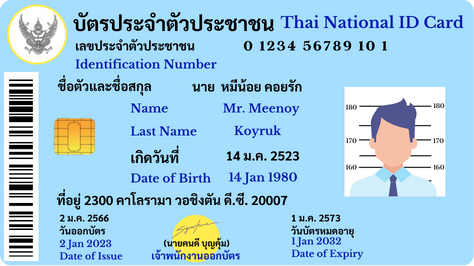
ดึงข้อมูลจากรูปถ่ายหรือสแกนบัตรประชาชน สำหรับ KYC เปิดบัญชี หรือลงทะเบียน พร้อม bounding box ของแต่ละฟิลด์
- Endpoint
POST /api/v3/key-extract/jobs- ไฟล์
national-id.jpg- ฟิลด์
- 8 ฟิลด์ · required 1
- ตาราง
- ไม่มี
- หลักฐาน
- bbox ต่อฟิลด์ (ค่าเริ่มต้น)
- ผลลัพธ์
- ผลจริงจากเอกสารตัวอย่าง
data_schema
json
{"type": "object","additionalProperties": false,"properties": {"national_id": {"type": "string","description": "เลขประจำตัวประชาชน 13 หลัก"},"full_name_th": {"type": "string","description": "ชื่อและนามสกุลภาษาไทย"},"full_name_en": {"type": "string","description": "First and last name in English"},"date_of_birth": {"type": "string","description": "วันเดือนปีเกิด"},"issue_date": {"type": "string","description": "วันออกบัตร"},"expiry_date": {"type": "string","description": "วันบัตรหมดอายุ"},"address": {"type": "string","description": "ที่อยู่บนบัตร"},"religion": {"type": "string","description": "ศาสนา"}},"required": ["national_id"]}
Request
อัปโหลดไฟล์ สร้างงานด้วย schema ด้านบน poll จนจบ แล้วดึงผล — ตัวอย่างนี้ส่ง instructions เพิ่มด้วย
import json, time, requestsAPI = "https://backend.aksonocr.com/api/v3/key-extract"headers = {"X-API-Key": "<YOUR_API_KEY>"}schema = json.load(open("schema.json", encoding="utf-8"))with open("national-id.jpg", "rb") as document:file_id = requests.post(f"{API}/files", headers=headers, files={"files": document}).json()["files"][0]["id"]job_id = requests.post(f"{API}/jobs",headers={**headers, "Idempotency-Key": "id-card-001"},json={"inputs": [{"file_id": file_id}],"data_schema": schema,"instructions": "บัตรมีทั้งข้อความไทยและอังกฤษ เลขบัตรมี 13 หลัก อาจมีช่องว่างหรือขีดคั่น",},).json()["id"]while requests.get(f"{API}/jobs/{job_id}", headers=headers).json()["status"] not in {"completed", "failed", "cancelled", "expired"}:time.sleep(2)result = requests.get(f"{API}/jobs/{job_id}/result", headers=headers).json()print(result["data"])print(result["validation"])
ผลลัพธ์
ผลจริงจากเอกสารตัวอย่าง ตัด field_metadata ให้เหลือบางฟิลด์ (ผลเต็มมีทุกฟิลด์ใน data)
json
{"needs_review": false,"data": {"national_id": "0 1234 56789 10 1","full_name_th": "นาย หมีน้อย คอยรัก","full_name_en": "Mr. Meenoy Koyruk","date_of_birth": "14 Jan 1980","issue_date": "2 Jan 2023","expiry_date": "1 Jan 2032","address": "2300 คาโลรามา วอชิงตัน ดี.ซี. 20007","religion": null},"field_metadata": {"/national_id": {"status": "verified","confidence": 1,"regions": [{"page": 1,"bbox": [0.506,0.132,0.823,0.203],"text": "0 1234 56789 10 1"}]},"/full_name_en": {"status": "verified","confidence": 0.96,"regions": [{"page": 1,"bbox": [0.46,0.361,0.637,0.447],"text": "Mr. Meenoy"},{"page": 1,"bbox": [0.485,0.455,0.599,0.526],"text": "Koyruk"}]},"/religion": {"status": "not_found","confidence": null,"regions": []}},"validation": {"missing_required": [],"below_threshold": []}}
ฟิลด์ที่ไม่มีบนบัตร (religion) เป็น null ใน data และได้ status: "not_found" ค่าที่อยู่หลายบรรทัด เช่นชื่ออังกฤษ ได้หลาย region ระบบไม่จัดรูปแบบเลขบัตรหรือวันที่ให้ — แปลงฝั่งคุณถ้าต้องการรูปแบบเดียว
ความหมายของ status, confidence และ bbox อยู่ที่ การดึงผลลัพธ์