Key Extraction v3 · ตัวอย่าง
ใบเสร็จ
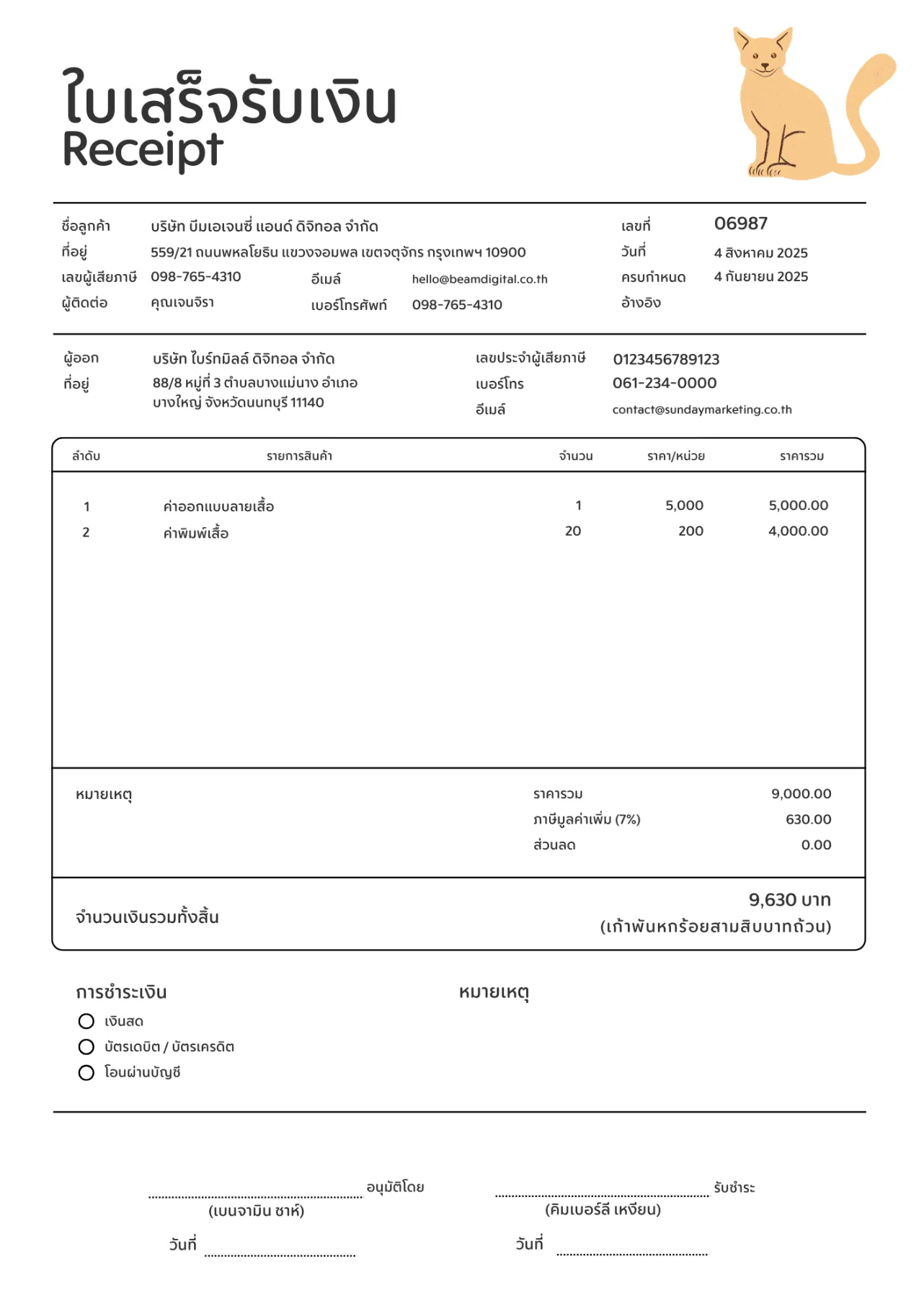
ใบเสร็จรับเงิน — เลขที่ วันที่ ผู้ขาย ลูกค้า ตารางรายการ VAT และยอดสุทธิ พร้อม bounding box
- Endpoint
POST /api/v3/key-extract/jobs- ไฟล์
receipt.jpg- ฟิลด์
- 9 ฟิลด์ · required 2
- ตาราง
items[]- หลักฐาน
- bbox ต่อฟิลด์ (ค่าเริ่มต้น)
- ผลลัพธ์
- ผลจริงจากเอกสารตัวอย่าง
data_schema
json
{"type": "object","additionalProperties": false,"properties": {"receipt_no": {"type": "string","description": "เลขที่ใบเสร็จ"},"date": {"type": "string","description": "วันที่ออกใบเสร็จ"},"seller": {"type": "string","description": "ชื่อผู้ออกใบเสร็จ"},"customer": {"type": "string","description": "ชื่อลูกค้า"},"items": {"type": "array","description": "รายการ","items": {"type": "object","additionalProperties": false,"properties": {"description": {"type": "string"},"quantity": {"type": "number"},"amount": {"type": "number","description": "จำนวนเงินของรายการ"}}}},"vat": {"type": "number","description": "ภาษีมูลค่าเพิ่ม"},"total": {"type": "number","description": "ยอดรวมสุทธิ"}},"required": ["receipt_no","total"]}
Request
อัปโหลดไฟล์ สร้างงานด้วย schema ด้านบน poll จนจบ แล้วดึงผล
import json, time, requestsAPI = "https://backend.aksonocr.com/api/v3/key-extract"headers = {"X-API-Key": "<YOUR_API_KEY>"}schema = json.load(open("schema.json", encoding="utf-8"))with open("receipt.jpg", "rb") as document:file_id = requests.post(f"{API}/files", headers=headers, files={"files": document}).json()["files"][0]["id"]job_id = requests.post(f"{API}/jobs",headers={**headers, "Idempotency-Key": "receipt-001"},json={"inputs": [{"file_id": file_id}],"data_schema": schema,},).json()["id"]while requests.get(f"{API}/jobs/{job_id}", headers=headers).json()["status"] not in {"completed", "failed", "cancelled", "expired"}:time.sleep(2)result = requests.get(f"{API}/jobs/{job_id}/result", headers=headers).json()print(result["data"])print(result["validation"])
ผลลัพธ์
ผลจริงจากเอกสารตัวอย่าง ตัด field_metadata ให้เหลือบางฟิลด์ (ผลเต็มมีทุกฟิลด์ใน data)
json
{"needs_review": false,"data": {"receipt_no": "06987","date": "4 สิงหาคม 2025","seller": "บริษัท ไบร์ทมิลล์ ดิจิทอล จำกัด","customer": "บริษัท บีมเอเจนซี่ แอนด์ ดิจิทอล จำกัด","items": [{"description": "ค่าออกแบบลายเสื้อ","quantity": 1,"amount": 5000},{"description": "ค่าพิมพ์เสื้อ","quantity": 20,"amount": 4000}],"vat": 630,"total": 9630},"field_metadata": {"/receipt_no": {"status": "verified","confidence": 1,"regions": [{"page": 1,"bbox": [0.77,0.162,0.835,0.178],"text": "06987"}]},"/total": {"status": "verified","confidence": 1,"regions": [{"page": 1,"bbox": [0.807,0.677,0.903,0.695],"text": "9,630 บาท"}]},"/items/1/amount": {"status": "verified","confidence": 1,"regions": [{"page": 1,"bbox": [0.172,0.397,0.251,0.414],"text": "ค่าพิมพ์เสื้อ"},{"page": 1,"bbox": [0.606,0.397,0.633,0.413],"text": "20"},{"page": 1,"bbox": [0.828,0.397,0.9,0.413],"text": "4,000.00"}]}},"validation": {"missing_required": [],"below_threshold": []}}
เซลล์ในตาราง เช่น /items/1/amount อาจได้ region ของทั้งแถว (คำอธิบาย จำนวน และยอดเงิน) ใช้ region ที่ text ตรงกับค่าเมื่อต้องการกรอบเฉพาะเซลล์
ความหมายของ status, confidence และ bbox อยู่ที่ การดึงผลลัพธ์